Overview
Annotation labels are the reusable vocabulary you attach to Calendar annotations — the names, colors, and reasons used for events, reserved blocks, and operating-hours exceptions. You manage them on the Annotations page.
Where to find it
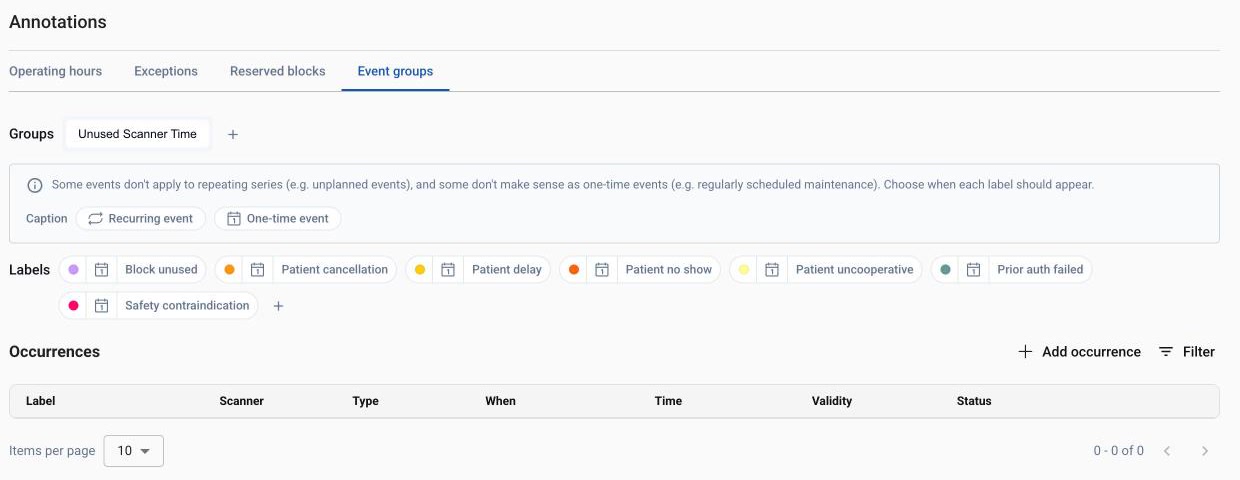
Open Explore > Annotations. The page has four sections: Operating hours, Exceptions, Reserved blocks, and Event groups. (Earlier versions kept this under Settings; those links now redirect here.)
Access and permissions
Viewing every section is ungated — no permission is needed to read what is configured. Changing a section requires its own capability:
Operating hours and Exceptions — Change operating hours and exceptions.
Reserved blocks and Event groups — Schedule reserved blocks and events lets you add, edit and delete their occurrences (event groups share the reserved-blocks capability). Defining the blocks and event groups themselves — creating, renaming, copying, recoloring or deleting them, and editing their rules and labels — also takes Define reserved blocks and event groups.
Without the section's capability you see a view-only banner. With Schedule reserved blocks and events but not Define reserved blocks and event groups, you can manage occurrences, but the block, group and label controls are disabled.
Label groups and types
Event groups — groups you create, each holding event labels. A label has a name, a color, and a cadence (one-time, recurring, or both); new labels start one-time. Event labels aren’t treated as openings or closures and don’t affect your metrics by default, though you can still compute statistics on them.
Reserved-block names — named, colored blocks; each can carry rule filters (for example body section, patient class, or sedation).
Exception reasons — the reasons offered when you create an exception, split into Open (extends availability) and Closed (a closure). These are set up for your site and are read-only — there’s no UI to edit the reason vocabulary. Reasons include — Closed: Planned Maintenance, Unplanned Downtime, Planned Downtime, Unstaffed, Holiday / Closure, External Disruption, Research Use, Training Use, Decommissioned, Other - Closed; and Open: Extended Hours, Other - Open.
Managing labels
Event groups: add / rename / remove a group; add / rename / recolor a label, toggle its cadence, or remove it. A label always keeps at least one cadence, and a cadence that’s in use on the Calendar is locked. A group must keep at least one label — to get rid of its last label, delete the group instead.
Reserved blocks: add, rename, make a copy, recolor, add/remove rule filters, or delete a block name.
A group, label, or block that’s currently in use on the Calendar can’t be deleted. Group names and block names must be unique; label names must be unique within their group.
Using labels when annotating
When you create an annotation, these labels populate the pickers: the Exceptions Reason dropdown (grouped Open / Closed), the Events Group + Label comboboxes, and the Reserved blocks Label field. See Calendar annotations: operating hours & events for more about annotations.